

You can create a free, ready-to-print flyer for your stolen car straight from your report on StolenCars.uk. Register, submit a report, then press the Print flyer button on your vehicle’s page. You get an A4 poster with your photos, number plate, reward and a QR code that takes people straight to your report. Print it, or save it as a PDF to share online.
Why create a stolen car flyer?
A clear, shareable flyer helps you get more eyes on your stolen vehicle, both online and offline. It makes it easier for neighbours, local businesses and community groups to recognise your car quickly, and the QR code lets anyone who spots it open your report, see every photo and message you in seconds.
If your car has been stolen, report it to the police and your insurance company as soon as possible, alongside using community tools like StolenCars.uk.
Step 1: Register your free account
- Go to the registration page: stolencars.uk/register
- Fill in your details (name, email and a secure password), or sign up with Google.
- If you signed up with an email address, confirm it by clicking the link we email you.
Once registered, you can sign in, create reports and print flyers for them.
Step 2: Submit a stolen car report
- Sign in, then go to stolencars.uk/report-stolen.
- Enter the key details about your vehicle:
- Registration (number plate)
- Make, model and year
- Colour and any distinguishing features or modifications
- Where and when it was stolen, your crime reference number and any reward
- Add clear photos. The first three appear on your flyer, so they make it far more effective.
Check everything is correct, then submit the report. It goes live straight away.
Step 3: Open your report page
Every report gets its own public page on StolenCars.uk, like this example: stolencars.uk/stolen-audi-rs-3-tfsi-quattro-s-a-yl25fbj.
You’ll land on it straight after submitting. You can also find it from your profile, or by searching for your registration on the site.
Step 4: Click “Print flyer”
Near the top of your report, next to the Share buttons (WhatsApp, Facebook, X, email and copy link), you’ll see Print flyer.
 The Print flyer button sits next to the Share buttons on every report.
Click it and your flyer is created instantly from your report’s details and photos:
- a large STOLEN banner and “Have you seen this vehicle?”
- up to three of your photos
- the make, model, colour and your number plate
- your reward, if you’ve offered one
- when and where it was stolen, and your crime reference number
- a “Seen it? Don’t approach it. Call 101” reminder
- a QR code linking to your report, so people can see updates and message you
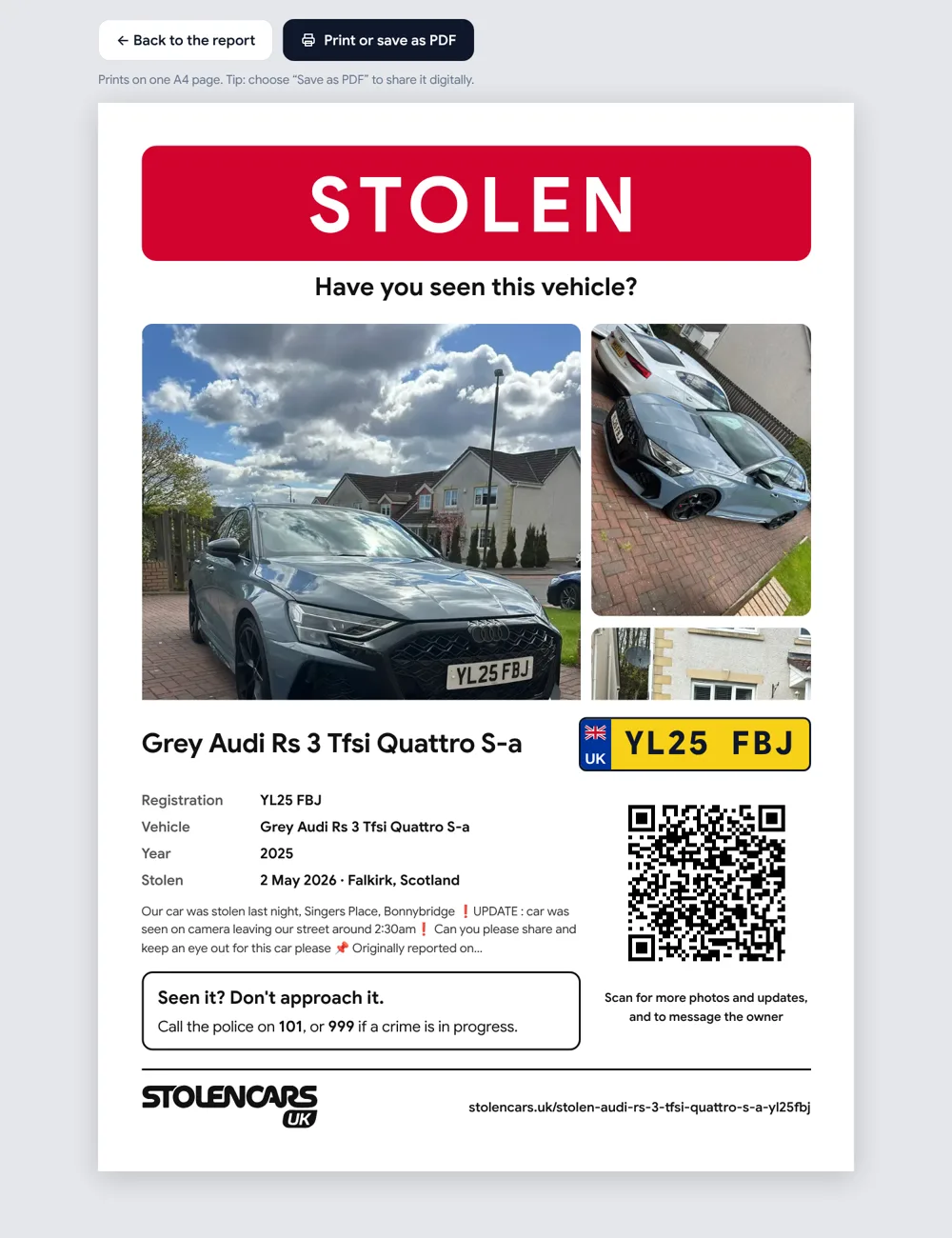 Your flyer fits on one A4 page, ready to print.
Step 5: Print it or save it as a PDF
Press Print or save as PDF at the top of the flyer:
- To print: choose your printer. The flyer is sized to fit exactly one A4 page, in colour or black and white.
- To save a PDF: choose “Save as PDF” as the printer (on a phone, use Print and then Share or Save). The PDF is ideal for print shops, email and messaging apps.
Step 6: Put it up and share it
Once you have your flyer, you can:
- Print it at home or at a local print shop and put it up in:
- local shops, cafés, petrol stations and community centres
- car parks, residential blocks and noticeboards
- Share it online:
- send the PDF to WhatsApp groups and community chats
- post it in local Facebook groups and neighbourhood forums
- send it to friends, family and colleagues who can keep an eye out
Sharing your report’s link works well too. Links to StolenCars.uk reports show a preview with your car’s photo, number plate and reward on Facebook, WhatsApp and X.
The more places your flyer appears, the more people will recognise your vehicle and the better your chances of a sighting.
Extra tips for an effective flyer
- Use the clearest front or three-quarter photo of your car as your first photo, so it’s instantly recognisable.
- Make sure the key details (registration, make, model, colour and area stolen) are correct before you print. If anything changes, edit your report and print a new flyer.
- Add any standout features to your description (unique wheels, stickers, damage) so they appear on the flyer and help people identify the car quickly.
- Offering a reward? Add it to your report and it’ll appear in large type on your flyer.
Combined with an official police report and telling your insurer, a flyer from StolenCars.uk is a powerful way to get the community helping to find your stolen vehicle.